Quick version:
Open Safari. Go to faxdrop.com. Upload your document. Enter the fax number. Tap send. Two free faxes per month, up to 5 pages including cover, no account needed.
You Need to Fax Something. You Have an iPhone.
Someone just told you to “fax this over.” You do not own a fax machine. You are not near a computer. All you have is your iPhone.
The App Store has many fax apps. Their account, trial, and subscription terms vary. Verify the current provider page before entering payment details. You just need to send one fax.
You do not need an app. Your iPhone already has everything required: Safari and an internet connection. For a full breakdown of every option when you want to send without downloading anything, see our guide on how to fax from iPhone without an app.
How to Fax from Your iPhone: 5 Steps
Step 1: Open Safari
Tap the Safari icon on your iPhone. Chrome and other browsers work too, but Safari is already there.
Step 2: Go to faxdrop.com
Type faxdrop.com in the address bar. The site loads instantly on mobile. No app download. No account creation required for your first two free faxes.
Step 3: Upload your document
Tap the upload area. Pick your file from:
- Files app (PDFs)
- Photos (JPG, PNG)
- iCloud Drive or Google Drive
- Your camera (snap a photo of a paper document)
FaxDrop accepts PDF, JPG, and PNG. One paid fax credit covers up to 10 uploaded pages.
Step 4: Enter the fax number
Type the full US or Canada fax number with area code. You can include +1 at the front. FaxDrop formats it automatically.
Step 5: Tap send
FaxDrop converts your document, dials the number, and transmits. Check the status page for the latest available update.
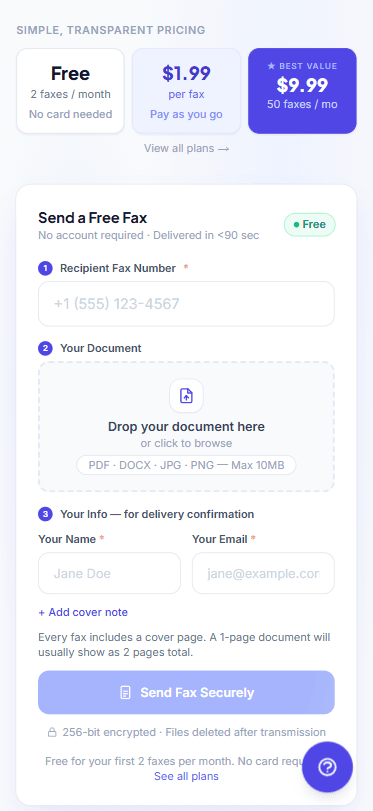
The FaxDrop send screen on iPhone Safari.
Two free faxes a month, up to 5 pages including cover. No app download or subscription required.
Try FaxDrop FreeFax Apps vs. Browser-Based Faxing
Every competitor pushes you to download an app. Here is what that actually means:
| Fax Apps | FaxDrop (Browser) | |
|---|---|---|
| Download required | Required | No |
| Account required | Check current terms | No (free tier) |
| Pricing | Check current terms | $1.99/fax or free |
| Time to first fax | App setup required | No app setup |
| Works on iPad | Check platform support | Same URL, same steps |
| Works on other devices | Check platform support | Any device with a browser |
FaxDrop gives you 2 free sends per month, up to 5 total pages each including the cover page, with no card and no download. After that, one paid credit costs $1.99, or $1.00 per credit in a 10-pack. Other providers change pricing and plan terms, so verify their current product pages.
If you fax once or twice a year, compare one-time options with recurring plans. Pay for what you send. Skip the rest.
Works on iPad Too
The steps are identical on iPad. Open Safari, go to faxdrop.com, upload, enter the number, send. The larger screen makes document preview easier, but the workflow is the same.
No separate iPad app. No different instructions. If you searched “how to fax from iPad,” you are in the right place.
What You Can Fax from Your iPhone
FaxDrop accepts these file types:
- PDF - best format for faxing. Preserves layout and signatures.
- JPG and PNG - photos, scanned documents, screenshots.
- Word documents - export to PDF before uploading.
One paid fax credit covers up to 10 uploaded pages. An 11-page upload uses 2 credits.
Need to combine multiple files into one fax? Use the free PDF merge tool first. It runs in your browser, so your files stay on your device.
When You Need to Fax from Your iPhone
Doctor's office wants a signed form. Snap a photo, upload, fax. Done from the parking lot. Mental health providers and therapists also receive patient intake forms and referrals by fax. Send them from your phone between appointments.
IRS needs paperwork. The IRS accepts fax for Form 2848, Form 8821, and responses to notices. Send from your phone.
Real estate closing on a deadline. Your agent needs a signed disclosure faxed to the title company. Real estate professionals fax closing docs, disclosures, and title transfers from the road every day. Do it from the job site.
Insurance claim. Insurance companies accept proof of loss by fax. Keep the transmission record, and confirm what the insurer accepts as deadline evidence.
Social Security paperwork. SSA offices accept faxed forms. Send from wherever you are.
Is It Secure to Fax from an iPhone?
FaxDrop's fax carrier has a signed BAA. Read the healthcare faxing requirements. Broader vendor BAA coverage remains under review. Request current documentation before sending protected health information.
Your organization should confirm its requirements before faxing medical records, legal documents, tax forms, and financial paperwork.
The recipient sees a normal fax. They have no idea it came from a phone instead of a fax machine.
Pro tip: Add FaxDrop to your Home Screen
If you fax more than once, save yourself the typing:
- Open faxdrop.com in Safari.
- Tap the Share button (square with arrow).
- Scroll down and tap “Add to Home Screen.”
- Tap Add.
FaxDrop now launches like a native app from your home screen. No download, no App Store, no storage used.
What Does It Cost?
Free: 2 faxes per month. No credit card. No account required.
Pay-per-fax: $1.99 for one credit, covering one fax of up to 10 uploaded pages.
10-pack: $9.99 ($1.00 per credit). Purchased credits do not expire.
25-pack: $19.99 ($0.80 per fax). Purchased credits do not expire.
No monthly subscription required. If you fax regularly, FaxDrop also offers subscription plans starting at $9.99/month for 50 included credits. The one-time options remain available.
Other providers change their pricing and plan terms. Verify their current product pages before comparing them with FaxDrop.
Your iPhone is a fax machine now.
Open Safari. Upload your document. Enter the number. Send. Two free faxes per month, up to 5 pages including cover, no app download, no signup.
Send a Fax FreeNo app. No fax machine. No monthly fee.